Every task gets a score. Every score gets a next step.
Gaussian reads each task against your priorities and hands back two things: an impact score — so the vital few are obvious — and a concrete next step you can start in five minutes. Vague in, specific out.
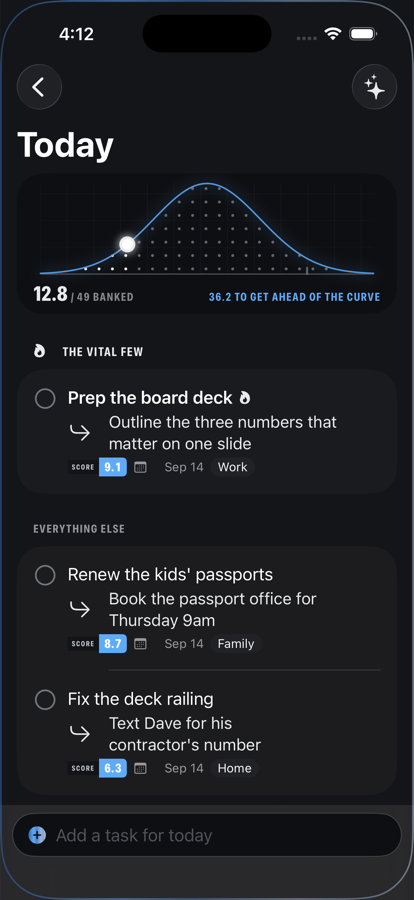
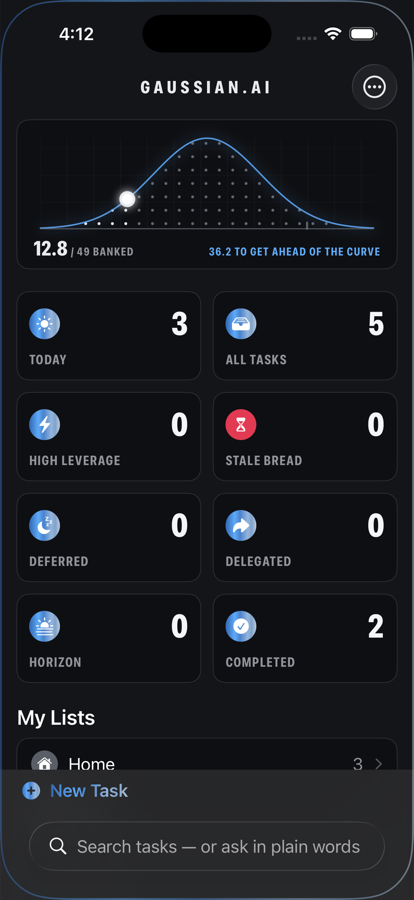
Add a task to get ahead of the curve
Capture tasks the way they arrive in your head — “fix car,” “sort out mom's thing.” Gaussian asks the clarifying questions a good chief of staff would, then hands you three to five concrete options for the next physical step. Grounded in your real life: it knows you don't drive, it knows who Sarah is, and it learns your world as you go.
Ranked by impact, not deadlines
Your North Star and your anchors — what matters and how you operate — drive every score. The top of your curve is yours, not a template's.
The 49-point day
Every task carries an impact score; your day is a curve that fills as you bank them. Four vital tasks fill it — so do nine average ones. Clear 50 and you're off the charts. Leverage finds your biggest wins per minute; Stale Bread calls out what you've been pretending to intend.
Your life never leaves your device
Protected names are swapped for pseudonyms before anything touches the network. Sensitive fields are opt-in. Everything is encrypted on your device — and we run no servers that ever see your tasks.
Privacy as architecture, not policy
Your children's names never leave your device. Not because we promise — because the app is built so they can't.
Native to its bones
Real SwiftUI on Mac and iPhone. The day curve lives on your home screen as a widget and in your Mac's menu bar; Siri and Shortcuts capture tasks from anywhere. Fast, quiet, no web wrapper — white, silver, and black, with one red light for the things that need you. From Nova Scotia.